 AMSI Raccoon Lab
AMSI Explained - The Antimalware Scan Interface
What is AMSI?
The Antimalware Scan Interface (AMSI) is a Windows API introduced in Windows 10 (2015) that provides a standardized interface for applications to request malware scans of in-memory content at runtime. It acts as a bridge between applications that handle potentially malicious content and the antimalware products installed on the system.
Before AMSI, script-based attacks were largely invisible to antivirus engines because:
- Scripts are interpreted at runtime (never written to disk as executables)
- Obfuscated scripts are deobfuscated in memory just before execution
- Traditional AV focused on scanning files on disk
AMSI solves this by allowing the scripting engine to submit the final deobfuscated content to the AV right before execution – after all layers of encoding, concatenation, and obfuscation have been resolved.
Architecture
AMSI operates as a three-party system:
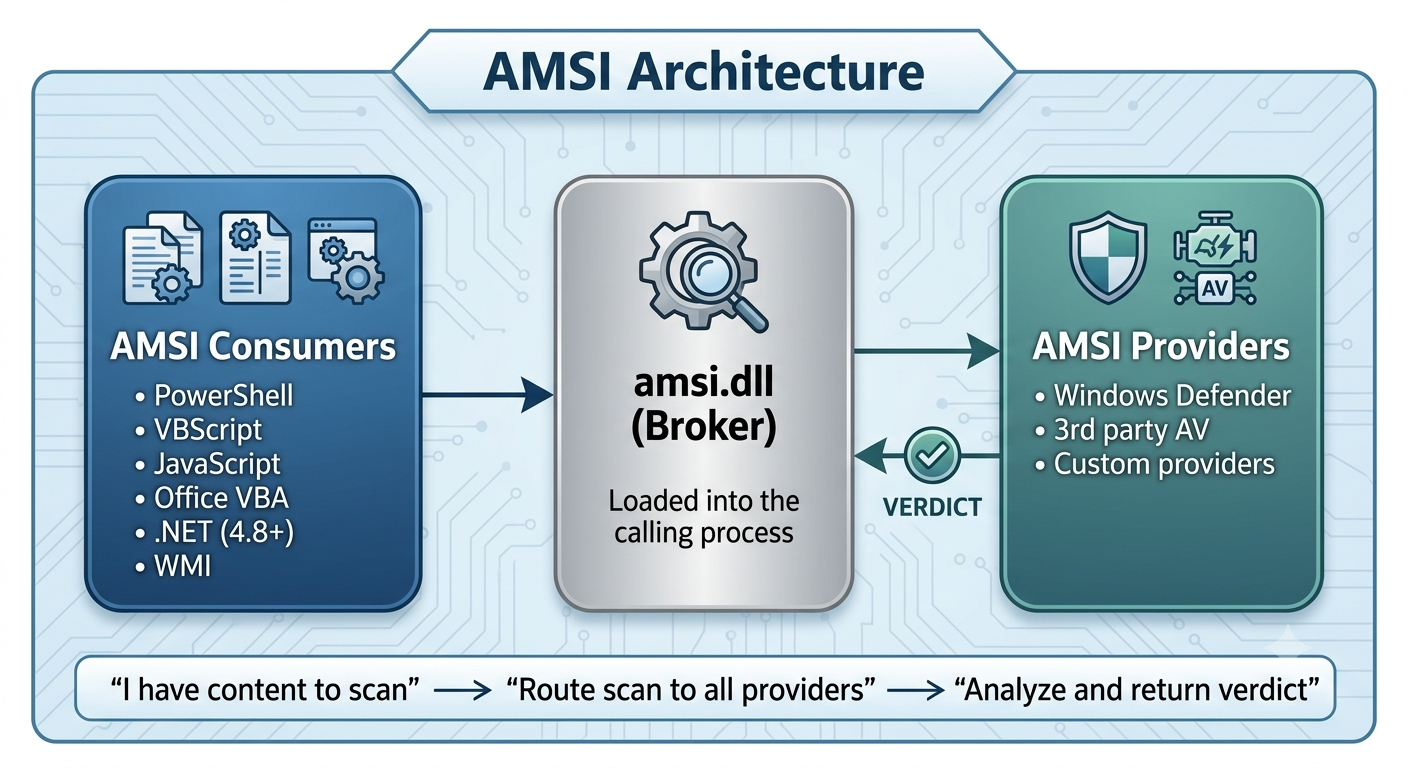
The Three Components
| Component | Role | Examples |
|---|---|---|
| Consumer | Application that submits content for scanning | PowerShell, cscript.exe, Office, .NET CLR |
| Broker | amsi.dll - routes scan requests to providers |
Windows system DLL (always present) |
| Provider | Antimalware engine that analyzes content | Windows Defender, MostShittyAVWrapper.dll |
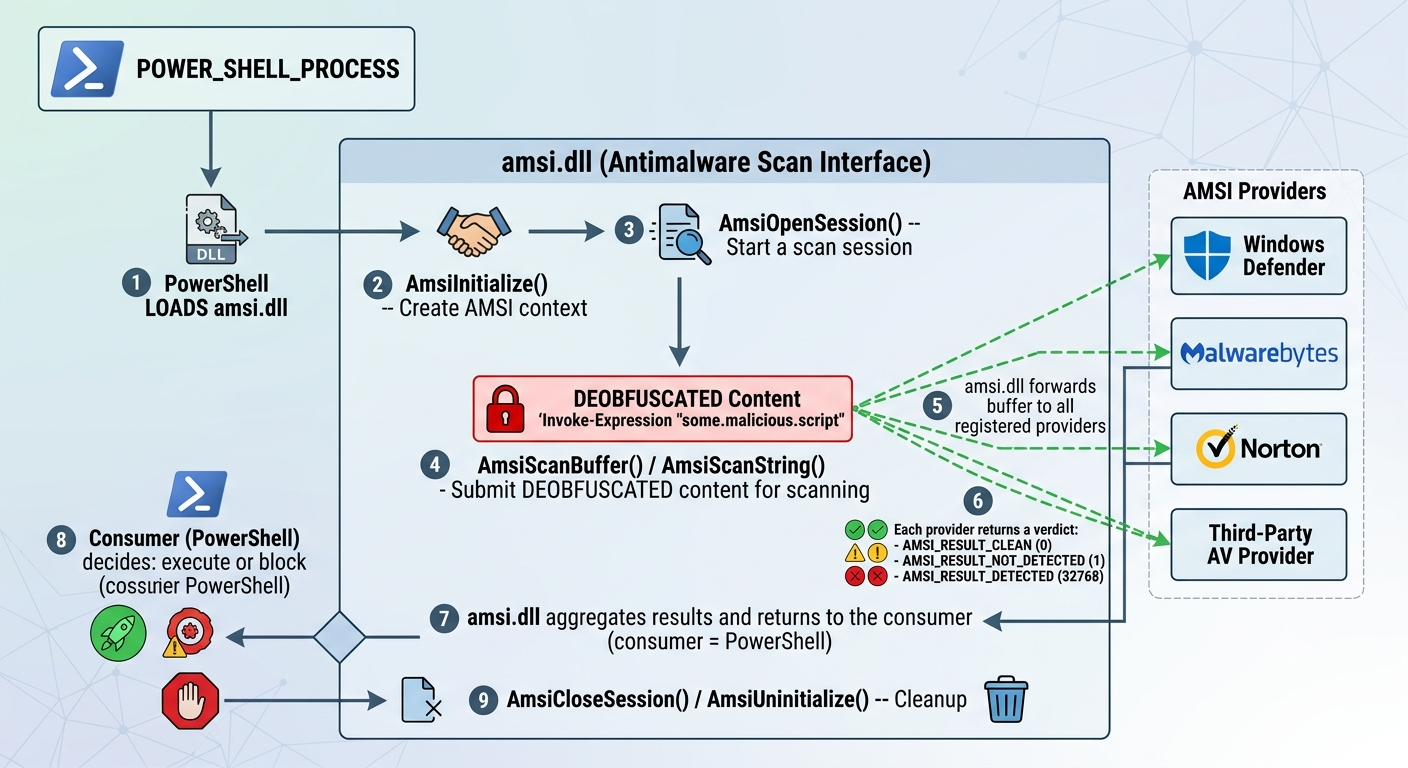
How a Scan Works (Step by Step)
When PowerShell executes a script, the following sequence occurs:
Key API Functions
AMSI exposes the following functions from amsi.dll:
Consumer-Side Functions
| Function | Purpose |
|---|---|
AmsiInitialize(appName, &context) |
Initialize AMSI for an application |
AmsiOpenSession(context, &session) |
Open a scan session (groups related scans) |
AmsiScanBuffer(context, buffer, length, name, session, &result) |
Scan a raw byte buffer |
AmsiScanString(context, string, name, session, &result) |
Scan a string |
AmsiCloseSession(context, session) |
Close a scan session |
AmsiUninitialize(context) |
Tear down AMSI context |
AmsiResultIsMalware(result) |
Helper: check if result >= 32768 |
Provider-Side Interface (COM)
Providers implement the IAntimalwareProvider COM interface:
interface IAntimalwareProvider : IUnknown {
    HRESULT Scan(
        IAmsiStream *stream,      // Content to scan
        AMSI_RESULT *result       // Verdict output
    );
    void CloseSession(ULONGLONG session);
    HRESULT DisplayName(LPWSTR *displayName);
};
Provider Registration
AMSI providers register via COM in the Windows registry:
HKLM\SOFTWARE\Classes\CLSID\{<provider-GUID>}
    (Default) = "Provider Display Name"
    \InprocServer32
        (Default) = "C:\path\to\provider.dll"
        ThreadingModel = "Both"

HKLM\SOFTWARE\Microsoft\AMSI\Providers\{<provider-GUID>}
    (Default) = "Provider Display Name"
Registration requires Administrator privileges, but the provider DLL then runs in user-mode inside the calling process.
What AMSI Scans
AMSI-aware applications submit content at these points:
| Application | What Gets Scanned |
|---|---|
| PowerShell | Every script block before execution (after deobfuscation) |
| VBScript/JScript | Script content via cscript.exe / wscript.exe |
| Office VBA | Macro code before execution |
| .NET (4.8+) | Assembly.Load() from memory, dynamically generated code |
| WMI | WMI script content |
| Windows Script Host | All WSH script executions |
Why AMSI is Bypassable
AMSI has a fundamental architectural limitation that makes it vulnerable to bypass:
1. User-Mode Execution
AMSI operates entirely in user-mode (Ring 3). The amsi.dll library is loaded into the same process address space as the code being scanned. A process has full read/write access to its own memory, meaning it can:
- Overwrite AMSI function code in memory (patching)
- Modify the AMSI context structure
- Unhook or redirect function calls
- Corrupt internal state
2. No Integrity Protection
There is no kernel-mode verification that amsi.dll or the provider DLLs remain unmodified after loading. Once loaded, their code pages can be made writable and altered.
3. Pre-Scan Execution Window
The scan only happens when the consumer explicitly calls AmsiScanBuffer. If an attacker can execute code before the scan (or prevent the scan from being called), AMSI never sees the malicious content.
4. COM Registration Hijacking
Since providers are registered via COM, an attacker with user-level write access to HKCU\SOFTWARE\Classes\CLSID can redirect the provider CLSID to a benign DLL, effectively replacing the AV engine with a no-op.
Common Bypass Categories
| Technique | How It Works |
|---|---|
| AmsiScanBuffer patch | Overwrite first bytes of the function to return “clean” |
| amsiInitFailed | Force the AMSI context to a failed state so scans are skipped |
| AmsiOpenSession patch | Prevent sessions from being opened |
| DLL hijacking | Load a fake amsi.dll before the real one |
| COM provider hijack | Redirect the provider CLSID to a benign DLL |
| Reflection | Use .NET reflection to modify internal AMSI fields |
| Hardware breakpoints | Use debug registers to intercept and modify scan calls |
| ETW patching | Disable Event Tracing for Windows to avoid detection logging |
| String obfuscation | Construct bypass payloads dynamically to avoid signature detection |
How This Project Uses AMSI
The AMSI Raccoon Lab registers a custom AMSI provider (MostShittyAVWrapper.dll) that implements the same intentionally weak 6-check detection engine as the standalone scanner:
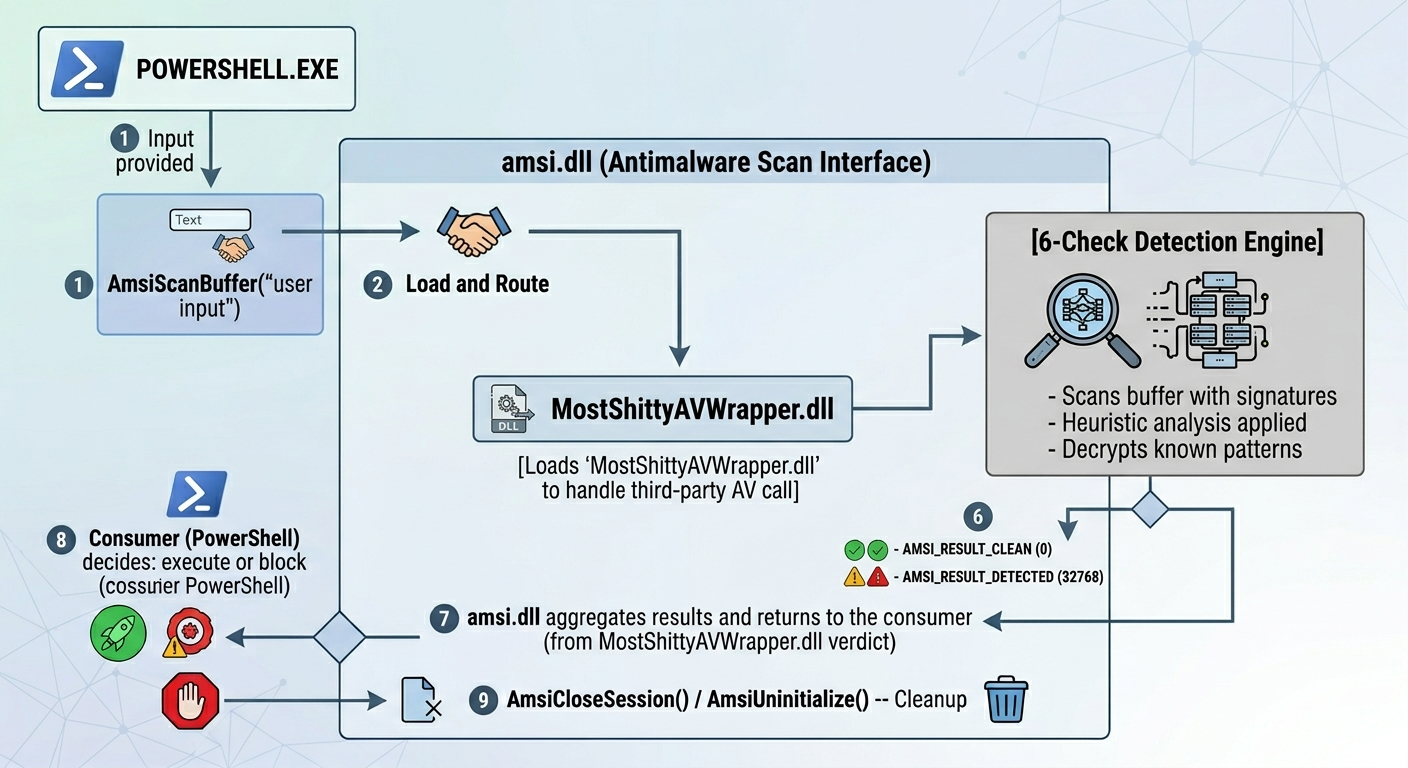
This allows you to practice AMSI bypass techniques in a safe environment. The 13 AMSI bypass challenges (31-43) cover real-world techniques used by red teamers and malware authors, applied against this intentionally vulnerable provider.
AMSI Bypass Challenges in This Lab
| # | Challenge | Technique |
|---|---|---|
| 31 | amsi-init-failed | Force AMSI initialization failure |
| 32 | amsi-scanBuffer-patch | Patch AmsiScanBuffer to always return clean |
| 33 | amsi-context-corruption | Corrupt the AMSI context structure |
| 34 | amsi-provider-redirect | Redirect provider COM registration |
| 35 | amsi-dll-hijack | Load a fake amsi.dll |
| 36 | amsi-reflection-bypass | Use .NET reflection to disable AMSI |
| 37 | amsi-clm-bypass | Bypass Constrained Language Mode |
| 38 | amsi-hardware-breakpoint | Use hardware breakpoints to intercept scans |
| 39 | amsi-string-obfuscation | Obfuscate bypass code to avoid detection |
| 40 | amsi-runspace-bypass | Create a clean runspace without AMSI |
| 41 | amsi-unhooking | Restore original amsi.dll from disk |
| 42 | amsi-com-hijacking | Full COM server hijack via registry |
| 43 | etw-patching | Disable ETW to prevent bypass detection logging |
Further Reading
- Scanner Architecture - How the detection engine works internally
- BYPASS_TECHNIQUES.md - Full bypass reference for all checks
- USAGE_COMPARISON.md - AMSI Provider DLL vs Standalone EXE
- Microsoft AMSI Documentation - Official API reference