
PurpleSkjaldborg: Purple-Team Threat Modeling in the Browser
 PurpleSkjaldborg is a visual threat modeling tool that combines red team attack paths with blue team defensive controls on a single canvas. Zero dependencies, one HTML file, works offline. It integrates four industry-standard frameworks — STRIDE, PASTA, MITRE ATT&CK, and MITRE D3FEND — letting purple teams model offense and defense simultaneously without choosing one perspective over the other.
Skjaldborg (Old Norse) — a shield wall formation where defenders interlock shields against attackers. This tool helps you build that digital shield wall.
The Problem
Most threat modeling tools force a choice: model the attacker or model the defenses. Red teams diagram kill chains in one tool, blue teams document controls in another. The result is fragmented context — attack paths and defensive coverage never appear side by side, making it hard to identify gaps where an adversary path has no corresponding countermeasure.
Traditional tools also tend to be heavy: commercial licenses, complex installations, server dependencies, or framework-specific lock-in. If you just need to sketch a kill chain with your team during an assessment, the friction is too high.
The Solution
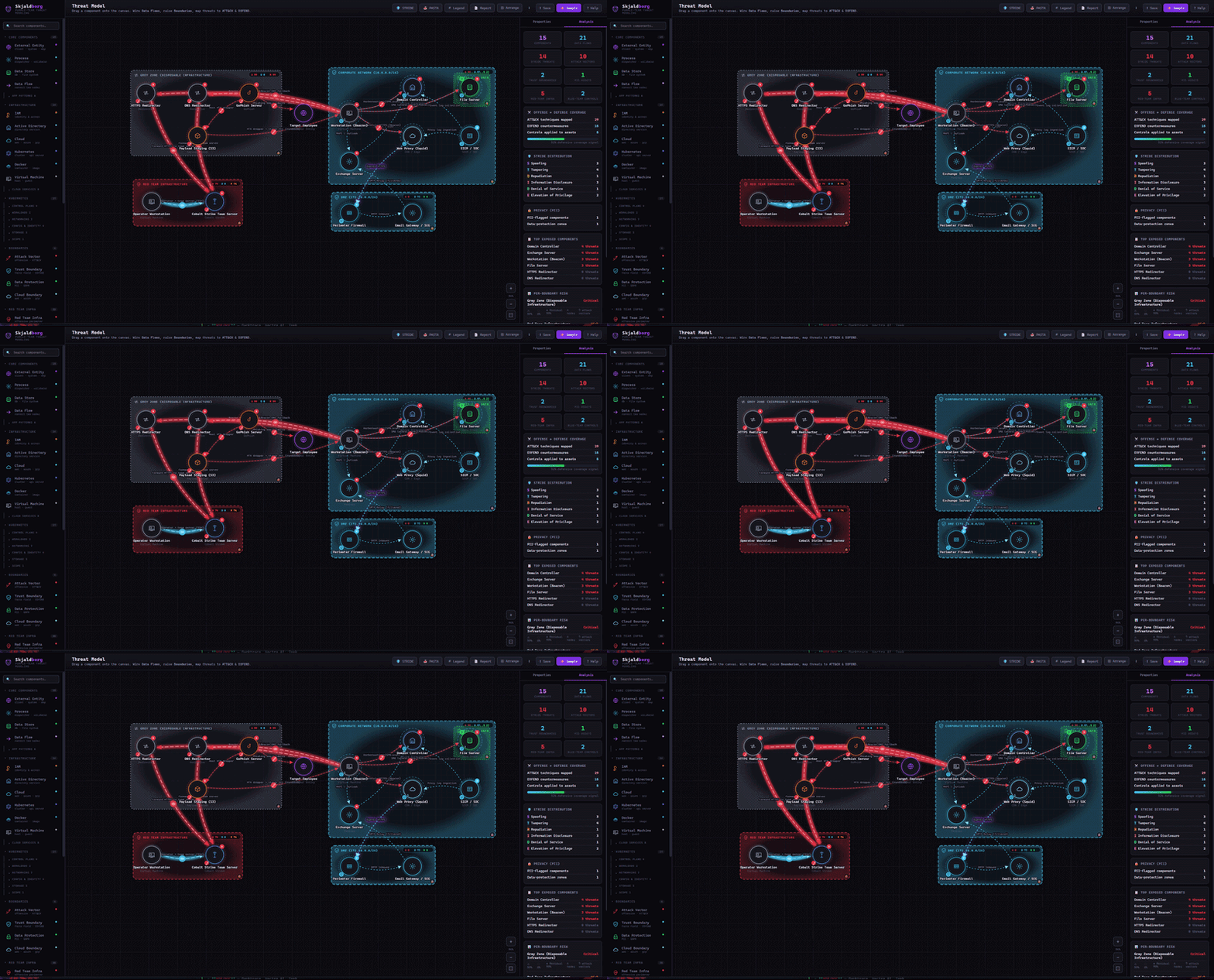
PurpleSkjaldborg renders attack paths and defenses together on a single SVG canvas. Red Team nodes come pre-mapped with ATT&CK technique IDs, Blue Team shields attach with D3FEND countermeasures, and per-boundary risk scoring exposes where you’re under-defended — all in a single index.html you can open from your filesystem.
Framework Integration
| Framework | Role in Skjaldborg |
|---|---|
| STRIDE | Threat categorization per element (Spoofing, Tampering, Repudiation, Info Disclosure, DoS, EoP) |
| PASTA | 7-stage risk-centric methodology mapped to canvas constructs |
| MITRE ATT&CK | Adversary techniques auto-mapped to Red Team nodes and attack edges |
| MITRE D3FEND | Defensive countermeasures auto-mapped to Blue Team shields and boundaries |
Red Team Arsenal
The offensive palette covers the major tooling categories used in real engagements:
- C2 Frameworks — Cobalt Strike, Brute Ratel, Sliver, Havoc, ArachneC2, AdaptixC2
- Phishing Infra — EvilGinx2, GoPhish, Tangled, PhishingClub
- Pivoting & Tunneling — Ligolo-ng, Chisel, SSH tunnels, SOCKS proxies, dnscat2, iodine
- Living off the Land — LOLBins, LOLDrivers, file transfer utilities
- Auto ATT&CK — Every Red Team node ships with pre-mapped technique IDs
Blue Team Shields
Defensive tools attach as shields on assets with force-ring layout and D3FEND coverage mapping:
- EDR/XDR — CrowdStrike Falcon, Microsoft Defender, Elastic Security, Sysmon
- NDR/NOC — Darktrace, Vectra AI, Zeek
- Network Filtering — pfSense, Suricata IDS/IPS, Squid
- Cloud Security — Prisma Cloud, CASB, AWS GuardDuty
- Hardening & Deception — ASR/GPO, Kyverno, HoneyPots/Decoys
Canvas & Visualization
- Animated tunnel edges — Red glow for offensive pivots, blue glow for defensive VPN
- Force-field boundaries — Trust (blue), Privacy/PII (green), Cloud (gradient), Network (dashed)
- Click-to-grab boundary movement — Click once to grab, move, click again to place
- Auto-arrange — Organizes nodes by role (corporate / DMZ / cloud / red team)
- Context menus — Right-click anything for quick rename, duplicate, toggle, delete
- Zoom & pan — Scroll to zoom, drag background to pan
Built-in Scenarios
The tool ships with 5 pre-built kill chain scenarios to explore or use as starting points:
| Scenario | Kill Chain | Key Techniques |
|---|---|---|
| AD Attack Chain | Phishing → Credential Theft → Lateral Movement → Domain Dominance | Kerberoasting, DCSync, Golden Ticket, WireGuard VPN pivot |
| K8s Cluster Compromise | Initial Access → Pod Escape → Control Plane Takeover | RBAC abuse, etcd dump, Ligolo-ng tunnel, Chisel backup |
| Cloud Identity Breach | Token Theft → Privilege Escalation → Data Exfiltration (Azure) | Consent phishing, MFA bypass, Service Principal abuse |
| Supply Chain Attack | CI/CD Poisoning → Registry Tampering → Cloud Workload Compromise | Pipeline injection, IRSA abuse, ECR poisoning |
| Ransomware (Double Extortion) | RDP Brute → Cobalt Strike → DCSync → Exfil → GPO Deploy | BYOVD EDR kill, rclone exfil, VSS/Veeam deletion |
Analysis & Reporting
- Per-boundary risk scoring — Attack surface vs. countermeasure coverage
- STRIDE matrix — Visual applicability grid for all elements
- PASTA stages — 7-stage methodology walkthrough mapped to your diagram
- Markdown report export — Full threat model document ready for wikis/PRs
- JSON import/export — Save and share models with your team
Architecture
index.html (single file, ~3000 lines)
├── <style>       — CSS: dark theme, animations, modal/overlay styles
├── <body>        — HTML: toolbar, palette, SVG canvas, inspector, overlays
└── <script>      — JS: state management, rendering, interactions, samples
    ├── COMPONENTS[]     — Node type definitions (icon, role, ATT&CK/D3FEND defaults)
    ├── STRIDE/PASTA     — Framework data structures
    ├── Render pipeline  — SVG: boundaries → edges → nodes (layered)
    ├── Interaction      — Drag, select, arm tools, context menus
    ├── Sample library   — 5 pre-built scenarios with spatial layout
    └── Help system      — Full-screen tabbed help (Tutorial/Metamodels/Workflow/Shortcuts/About)
No React, no D3, no build step. Opens in any modern browser, works offline.
Quick Start
# No build. No install. Just open it.
open index.html

# Or serve locally:
python -m http.server 8765
# then navigate to http://localhost:8765
The app loads an AD Attack Chain sample by default. Click Sample in the toolbar to explore all 5 built-in scenarios.
Keyboard Shortcuts
| Key | Action |
|---|---|
? |
Toggle Help panel |
Shift + click |
Keep tool armed (place multiple) |
Esc |
Cancel armed tool / deselect |
Delete / Backspace |
Delete selected element |
| Double-click edge | Toggle attack vector (offensive) |
| Right-click | Context menu |
| Scroll | Zoom |
| Drag background | Pan |
Links
◀ Back to the Blog